The security landscape for mobile devices just shifted. A critical flaw in the Android operating system, disclosed in May 2026, has put millions of devices at risk. This isn’t your typical “don’t click that link” scenario. We’re talking about a zero-click Remote Code Execution (RCE) vulnerability that requires no user interaction and no special permissions to exploit.
If you’re managing an enterprise fleet or just concerned about your own device, understanding this threat is a priority. Let’s break down what happened, how it works, and what you need to do to stay secure in 2026.
1. What is the Android zero-click RCE vulnerability (CVE2026-0073)?
The May 2026 Android Security Bulletin officially disclosed CVE-2026-0073, a critical security flaw located in the Android System component. Specifically, the vulnerability resides within the Android Debug Bridge (adb) daemon, known as adbd.
What makes this specific flaw so dangerous is its “zero-click” nature. Most mobile exploits rely on some form of social engineering (like a phishing text or a malicious app download) to get a foot in the door. With this Android zeroclick RCE vulnerability (CVE-2026-0073), an attacker can execute code on your device without you ever touching the screen.
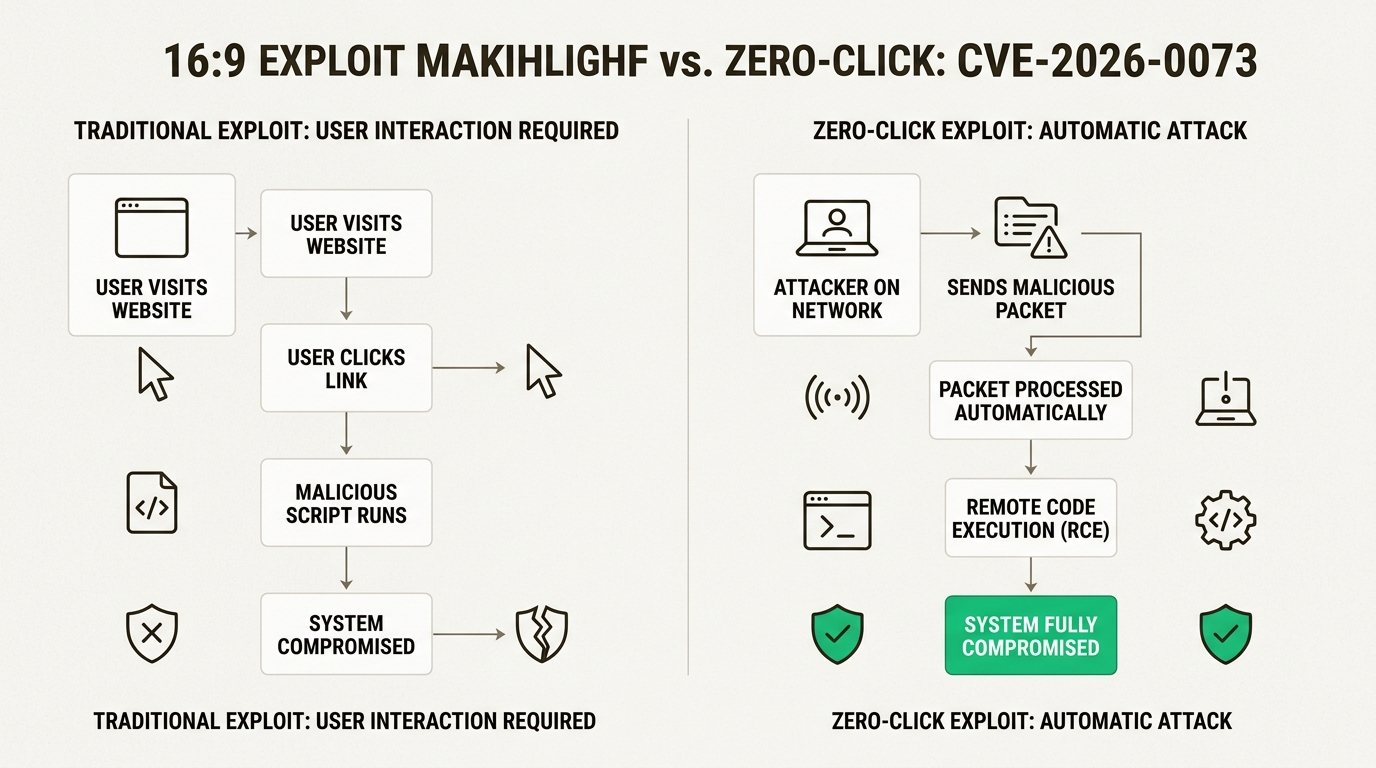
Figure 1: This infographic illustrates how CVE-2026-0073 bypasses user interaction, making it a silent and highly dangerous threat compared to traditional exploits.
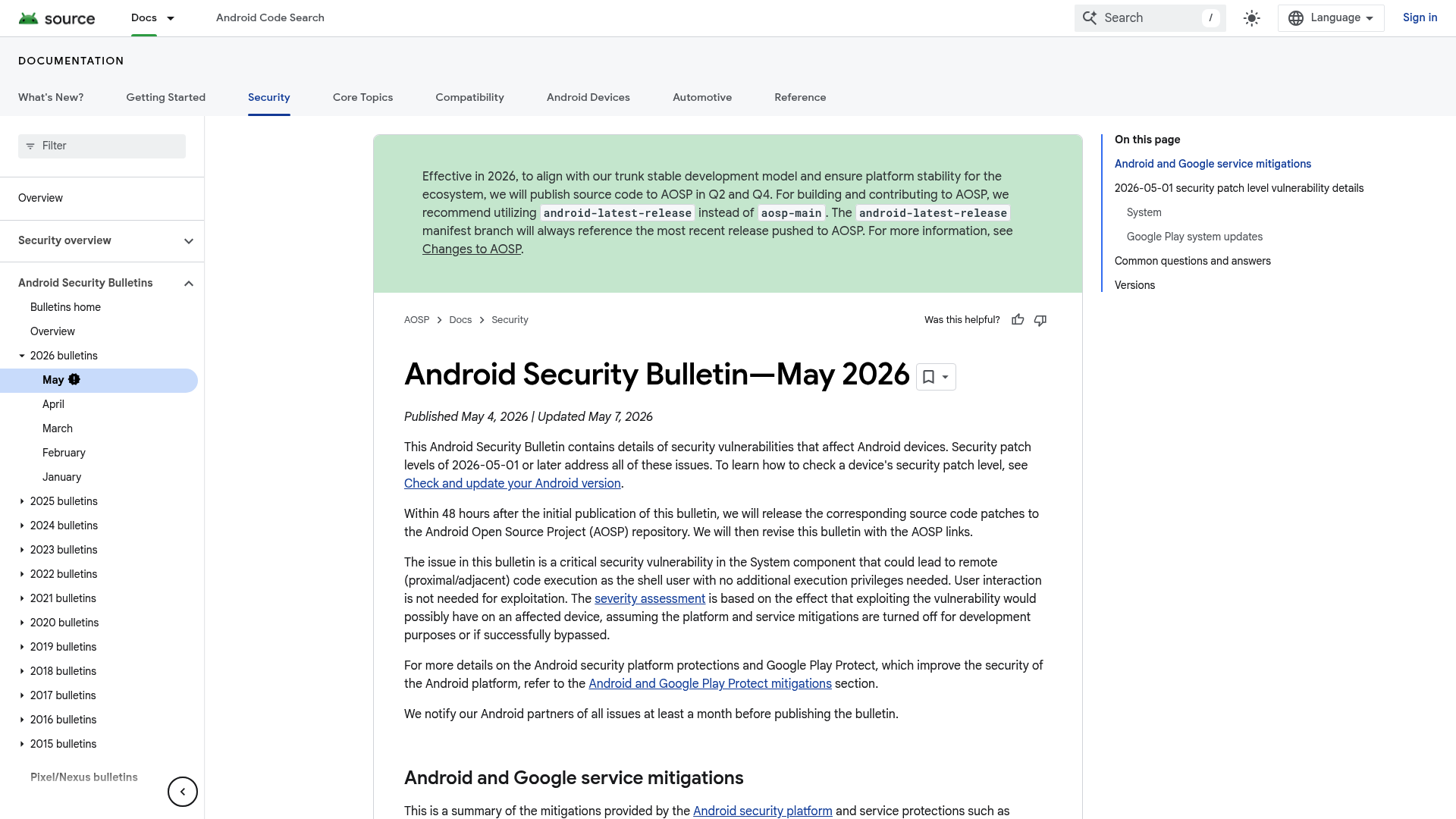
Figure 2: The May 2026 Android Security Bulletin details critical vulnerabilities including CVE-2026-0073.
Affected Android versions
According to the National Vulnerability Database, the following versions are vulnerable if they haven’t been patched:- Android 14- Android 15- Android 16- Android 16-QPR2
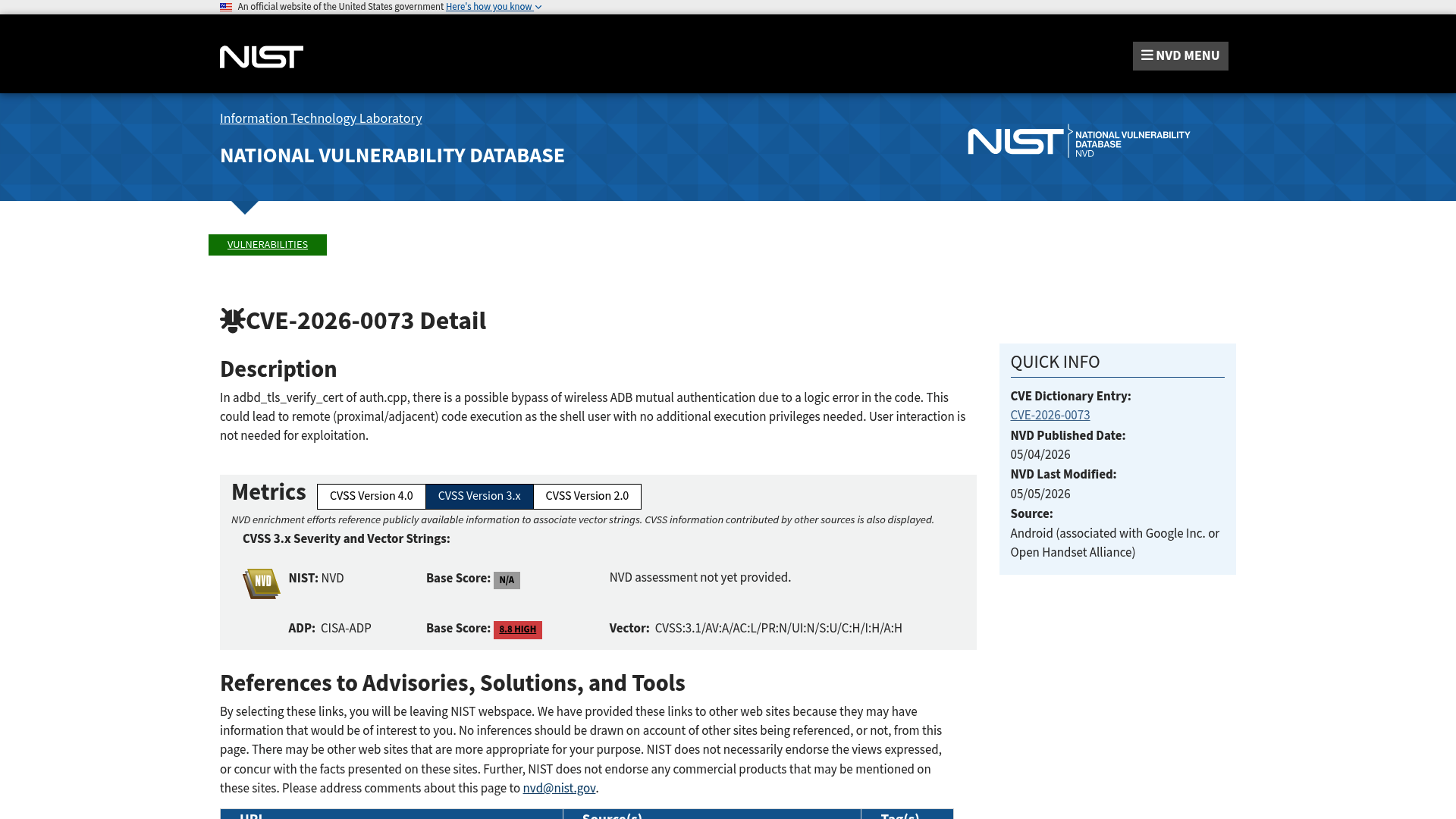
Figure 3: The NVD entry for CVE-2026-0073 highlights the critical 8.8 CVSS score.
The vulnerability has been assigned a CVSS 3.1 score of 8.8, which is categorized as “High” (and often treated as “Critical” in many security bulletins due to the ease of exploitation). It doesn’t require any special privileges or authentication from the attacker.
2. How the CVE-2026-0073 zero-click exploit works
To understand the exploit, you first have to understand the Android Debug Bridge (adb). It’s a versatile tool that lets developers communicate with a device for debugging, installing apps, and running shell commands. While traditionally used over USB, Android also supports wireless debugging over a local network.
The technical root cause of CVE-2026-0073 is a logic error in the adbd_tls_verify_cert function within the auth.cpp subcomponent of the ADB daemon.
The logic error in authentication
During a wireless ADB connection, the device and the host computer perform mutual authentication using TLS certificates. The code used a function called EVP_PKEY_cmp to compare cryptographic keys. The bug was simple but devastating: the code didn’t strictly check for a success return value. In many cryptographic functions, any non-zero value might be returned, but only “1” actually means the keys match. By failing to enforce this, the system could be tricked into accepting an invalid certificate, effectively bypassing the authentication process entirely.
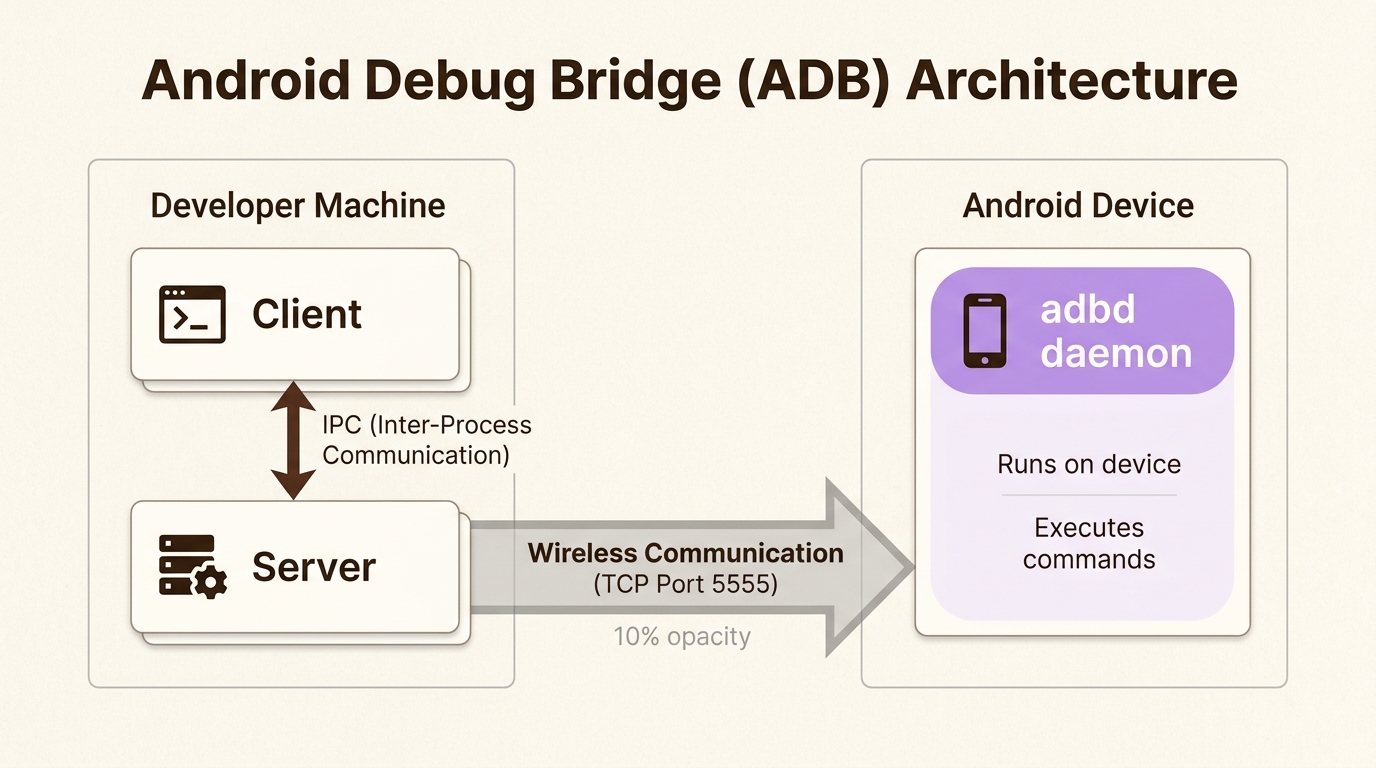
Figure 4: Understanding the ADB architecture, particularly the adbd daemon, is crucial to grasp how CVE-2026-0073 exploits wireless debugging.
The proximal attack vector
Because this flaw targets the wireless ADB communication protocol, it’s classif ied as a “proximal” or “adjacent” attack. This means the attacker must be on the same local network (like the same Wi-Fi) or within physical range (such as Bluetooth range) to reach the vulnerable adbd service.
Impact: Remote shell access
Once the authentication is bypassed, the attacker gains remote shell access to the device. This is significant for several reasons:
- Shell user privileges: The attacker can run commands as the “shell” user, which is enough to access many system files and settings.
-Sandboxing bypass: They can interact with other applications and potentially bypass standard app sandboxing protections.
-Persistence: With shell access, an attacker might be able to install malicious hooks or modify settings to maintain access even after you leave the network.
3. Why the Android zero-click RCE vulnerability (CVE2026-0073) is an enterprise crisis?
For most individual users, the risk is relatively low if they don’t frequent public Wi-Fi. But for organizations, this Android zero-click RCE vulnerability (CVE2026-0073) represents a major headache.
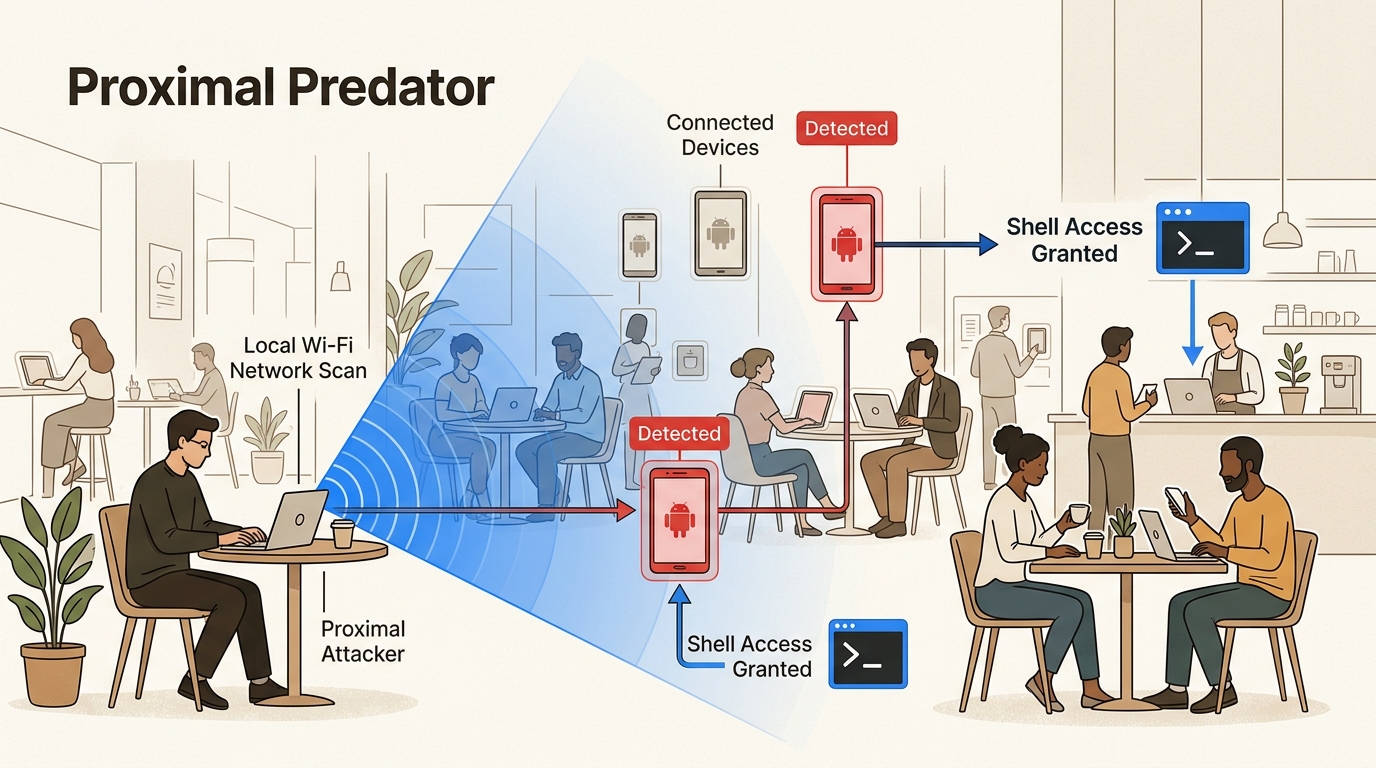
Figure 5: This visual demonstrates how an attacker’s physical proximity in shared networks enables silent exploitation of CVE-2026-0073, posing a major enterprise risk.
Risks to Bring Your Own Device (BYOD) policies
Many companies rely on employees using their own phones to access corporate email, Slack, and internal apps. If an employee brings an unpatched device into the office or uses it at a local coffee shop, they’re carrying a wide-open door to your data. Because it’s a zero-click exploit, the employee won’t even know they’ve been targeted.
Shared environments and lateral movement
In corporate offices, co-working spaces, or airports, being on a shared network is common. An attacker could potentially scan the network for any device with ADB enabled and exploit it silently. Once they have shell access to a mobile device, they can use it as a pivot point for lateral movement, attempting to reach more sensitive servers or databases on the internal network.
This is especially critical in high-stakes environments. For instance, cybersecurity challenges in the healthcare industry are already complex due to the volume of sensitive patient data. Adding an invisible mobile threat into the mix makes compliance and data protection even harder. Similarly, financial institutions must be extremely vigilant, as a compromised mobile device can be used to bypass multi-factor authentication (MFA) or scrape banking credentials.
Risks to Bring Your Own Device (BYOD) policies
Many companies rely on employees using their own phones to access corporate email, Slack, and internal apps. If an employee brings an unpatched device into the office or uses it at a local coffee shop, they’re carrying a wide-open door to your data. Because it’s a zero-click exploit, the employee won’t even know they’ve been targeted.
Shared environments and lateral movement
In corporate offices, co-working spaces, or airports, being on a shared network is common. An attacker could potentially scan the network for any device with ADB enabled and exploit it silently. Once they have shell access to a mobile device, they can use it as a pivot point for lateral movement, attempting to reach more sensitive servers or databases on the internal network.
This is especially critical in high-stakes environments. For instance, cybersecurity challenges in the healthcare industry are already complex due to the volume of sensitive patient data. Adding an invisible mobile threat into the mix makes compliance and data protection even harder. Similarly, financial institutions must be extremely vigilant, as a compromised mobile device can be used to bypass multi-factor authentication (MFA) or scrape banking credentials.
4. Detecting and mitigating the CVE-2026-0073 threat on your network
The good news is that Google has already released a fix. The challenge is ensuring that every device on your network actually has it installed. Here’s how you can manage the risk.
Immediate action: Check your security patch level
The most important step is to update all devices to the May 2026 security patch level (specifically the 2026-05-01 level or later).
You can check and update your Android version by going to Settings > Security & privacy > System & updates > Security update. If your patch level is earlier than May 2026, you’re likely vulnerable.
Detecting vulnerable assets on the network
If you’re an IT administrator, you can’t rely on users checking their settings. You need to see which devices are exposing the vulnerable ADB service. Tools like runZero can scan your network and identify these assets. You can use a query like: protocol:=adb AND os:Android to find any device with the ADB service active on your wireless subnet.
Enforcing defensive policies via MDM
The most robust way to mitigate the Android zero-click RCE vulnerability (CVE-2026-0073) is to ensure ADB is disabled on any device that doesn’t strictly need it for development.
- Disable Developer Options: For the vast majority of your workforce, Developer Options should be turned off entirely.
- MDM Restriction: Use your Mobile Device Management (MDM) or Enterprise Mobility Management (EMM) platform to push a policy that disables “USB debugging” and “Wireless debugging” globally.
- Network Segmentation: If you have a development team that needs ADB, isolate their devices on a separate, dedicated Wi-Fi network (or VLAN) that doesn’t have access to the main corporate environment.
5. Securing your mobile attack surface with PlutoSec
At PlutoSec, we take an engineering-first approach to security. We believe that security should accelerate your growth, not restrict it. Managing a modern attack surface means looking beyond just your servers and cloud instances. You have to account for every mobile device that touches your network.
Our Asset Attack Surface Management (ASM) services are designed to give you continuous visibility. We help you find those unmanaged or unknown devices that might be running vulnerable services like an exposed ADB daemon. By identifying these gaps in real-time, you can remediate them before an attacker even gets in range.
If you’re worried about how an attacker might move through your network after an exploit like this, our Breach and Attack Simulation (BAS) services can help. We can simulate RCE scenarios and lateral movement paths to test your existing defenses (like your SIEM or XDR platforms) and ensure they’re actually catching the red flags.
For organizations that need high-level guidance, our CISO as a Service (CISOaaS) provides the strategic leadership needed to build a resilient vulnerability management program. We can help you draft the policies and roadmaps that keep your mobile fleet secure against threats like CVE-2026-0073.
Don’t wait for the next zero-click threat to hit your headlines. Contact PlutoSec Canada today to strengthen your cyber resilience against Android threats and beyond.
Frequently Asked Questions
What exactly makes the Android zero-click RCE vulnerability (CVE2026-0073) so dangerous?
This vulnerability is particularly dangerous because it allows for Remote Code Execution without any user interaction. Unlike most attacks that require you to click a link or download an app, an attacker can exploit this flaw silently just by being on the same Wi-Fi network as your device.
Which devices are affected by the Android zero-click RCE vulnerability (CVE-2026-0073)?
Any device running Android 14, 15, or 16 (including 16-QPR2) is potentially vulnerable if it has not been updated to the May 2026 security patch level. The flaw is rooted in the system’s ADB daemon, which is common across most Android hardware manufacturers.
How do I know if my device is safe from the Android zero-click RCE vulnerability (CVE-2026-0073)?
You can verify your safety by checking your security patch level in your device settings. If your patch level is dated May 1, 2026, or later, your device has the necessary fix to protect against this specific vulnerability.
Can Google Play Protect stop the Android zero-click RCE vulnerability (CVE-2026-0073)?
While Google Play Protect provides important layers of security, zero-click vulnerabilities that target low-level system components like the ADB daemon can often bypass application-layer protections. The only guaranteed fix is to apply the system-level security patch from May 2026.
Is ‘Wireless Debugging’ related to the Android zero-click RCE vulnerability (CVE-2026-0073)?
Yes, the vulnerability specifically targets the authentication process used for wireless ADB connections. Disabling ‘Wireless debugging’ in your device’s Developer Options is a highly effective way to reduce your exposure to this specific exploit.
Should enterprises change their BYOD policies because of the Android zero-click RCE vulnerability (CVE-2026-0073)?
This vulnerability highlights the importance of enforcing security compliance on personal devices. Enterprises should use MDM tools to ensure that any device accessing corporate data is updated to the latest patch level and has unnecessary services like ADB disabled.

Written by
Admin User